UTSUSHI
- OBJ / Collada File Projecter -
by Yuzuru Jewell(KANAE PROJECT) produced by youwith. 04/09/09
UTSUSHI makes the background image for KANAE PROEJCT Tools from 3D object file.
UTSUSHI is a tool which reads an OBJ(.obj) / KANAE Collada(.dae) file and creates the background image for TATARA or ROKURO Pro or ROKURO or TOKOROTEN. And the outputted image can be used as Base Image of NOMI. You can make the sculpted prim which an avator attaches using this tool and TATARA. You can also combine multiple sculpted prims by them.
Download
UTSUSHI 1.0.4 (04/09/09)
Virus checked by NOD32 ver.5631.
License
The Software is provided "AS IS," without a warranty of any kind.
In no case shall the author be liable for any damage or unwanted behavior of any computer hardware and/or software.
All title and copyrights in and to the SOFTWARE (including but not limited to all images, photographs, animations, video, audio, music, text, and other information incorporated into the SOFTWARE), the accompanying printed materials, and any copies of the SOFTWARE, are owned by KANAE PROJECT.
The SOFTWARE is protected by copyright laws and international treaty provisions.
Operating environment
Windows 10 64bit/32bit
Install & Uninstall
Install
There is no installer.
Uninstall
You can uninstall only by deleting the file called "UTSUSHI.exe".
How to use this program
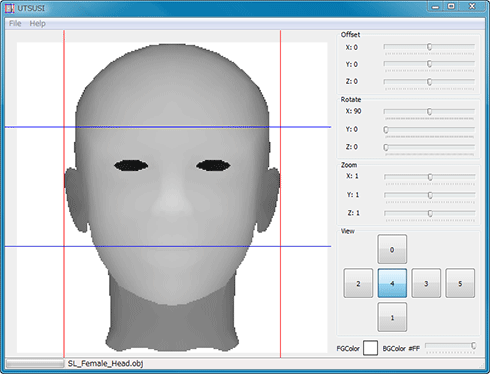
1) Read an OBJ / KANAE file by Load of the File menu.
2) Choose the display orientation by clicking the button of View GroupBox.
3) Adjust the location of an object, a rotation, and a scale factor.
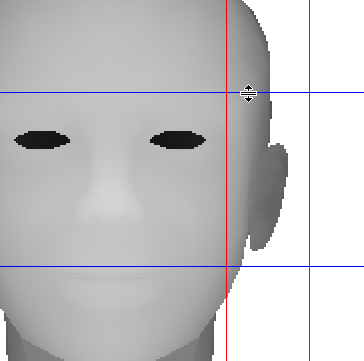
4) Adjust the size of the image cut off by draging the vertical lines and the horizontal lines of a preview pane.
5) Save an image by Save Image of the File menu.
* KANAE Collada file is the file whichi was saved by ROKURO, ROKURO Pro, NOMI, TATARA or KUMIKI.
How to use Edit Pane
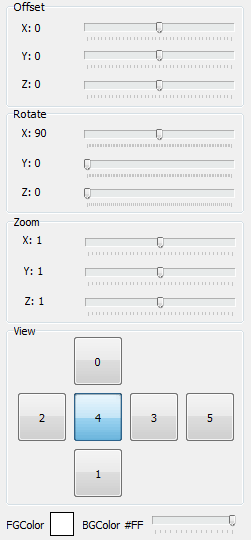
- Offset GroupBox
- You can change the display position of an object.
- Rotate GroupBox
- You can change a rotation of an object.
- Zoom GroupBox
- You can change the display scale factor of an object from 1/10 to 10.
- View GroupBox
- You can change the orientation which displays an object.
- FGColor
- You can change a foreground color.
- BGColor
- You can change the tone of a background color.
Save File Type
- Single Image(BMP)
- The image currently displayed is saved by a BMP file format.
- Single Image(PNG)
- The image currently displayed is saved by a PNG file format.
- 3 Images(PNG)
- The image of 0 and 3 and 4 of View are combined and saved one.
- 6 Images(PNG)
- All the images are combined and saved one.
* TATARA can use 3 Images (PNG) and 6 Images (PNG).
History
01/11/23
-The operating environment has been changed to 10.01/16/20
-The operating environment has been changed to Windows 8.1/10.11/19/10 UTSUSHI 1.0.4
-The bug of the size of the single image was fixed.-You can load KANAE Collada File.
04/09/09 UTSUSHI 1.0.3
-The modification function of a foreground color and a background color was added.04/04/09 UTSUSHI 1.0.2
-First releaseDonate
Please donate in-world at KANAE PROJECT Shop There is a donation box at that location.
Credits
- ImageEn by HiComponents 1998-2010
Thanks to KJ Georgette for help with this Readme file.